
BIM Bundle (Profile Builder / Quantifier Pro)
by mind.sight.studios, SketchUp plug-ins
Profile Builder and Quantifier Pro bundle for SketchUp, with perpetual licences
From a smart model to quantities and costs
With Profile Builder you build elements in SketchUp that remember their parameters, and with Quantifier Pro you get quantities and costs from that same model.
Parametric profiles instead of Follow Me
A profile can be any flat shape or even a polyline. Extrude it along a path and you get a smart element, which the manufacturer calls a Profile Member.
- Walls, mouldings, framing, piping, railings, foundations and roof details
- New profiles from a face or line in your model, saved to your own library
- Each profile keeps its placement point, rotation, dimensions, material, tag and junction style
- Free profile libraries for steel, timber, kerbs and mouldings, and profile swaps on existing elements in seconds


Assemblies: many profiles and components in one element
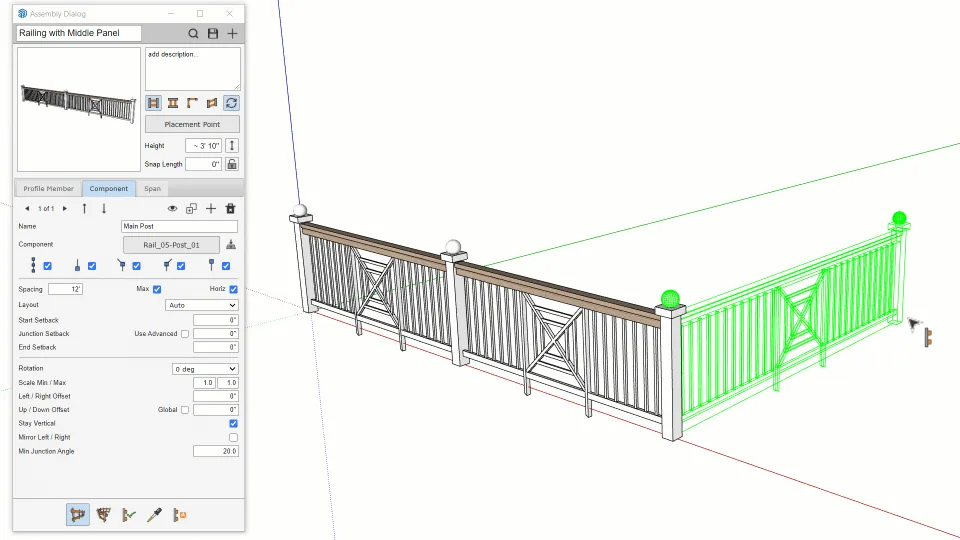
An Assembly combines as many profiles and components as you like into one object that follows a path: straight, curved, sloped or draped on terrain.
- Railings, cavity walls, fences, stairs, roads and kitchen cabinets
- Saved to your library for future projects or for your team
- Free ready-made Assemblies on 3D Warehouse that load straight in and can be customised
- One-click auto-assemble and an adjustable Assembly height
- Apply a different Assembly to an existing one to try out design options
Works with: 3D Warehouse


Changes without losing the parameters
Every element stays parametric after it is created, so a design change does not mean modelling it again from scratch.
- Change the profile, material, width, height, orientation and path at any time
- The profile keeps the correct orientation on any path, with continuous texture and softened edges
- Revolve a profile in two clicks to get parametric revolved elements
- Smart-Path Select picks the path for you with a double-click on an edge
- Tools to extend, split, join and trim, e.g. several members at once against a pipe


Openings that follow the element
With the hole tools you cut holes and openings such as doors and windows, even through nested groups and components.
- Elements remember the position and properties of each opening and rebuild it after changes
- In version 4 you can select, move, copy and edit existing openings
- In Assemblies, openings stay in place when the path or settings change


Quantities from the model with Quantifier Pro
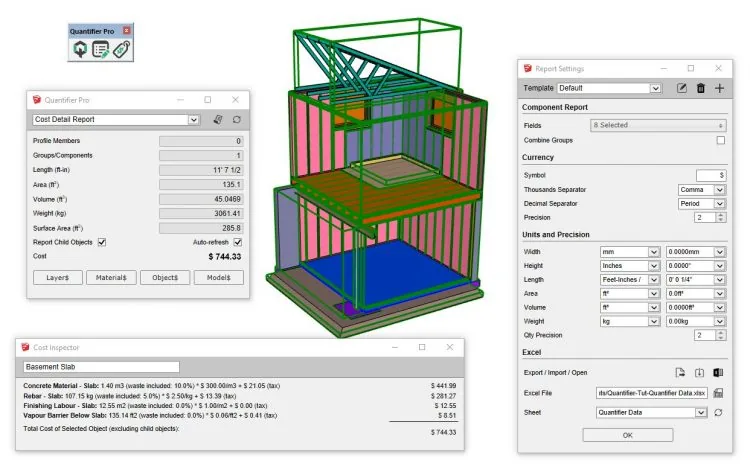
Quantifier Pro reads the groups and components of your model and returns quantities. The manufacturer has optimised it for use with Profile Builder.
- Area of walls, slabs, roofs, floors and cladding, both projected and actual
- Material report with the surface area of every material in the model
- Length, width and height of groups and components
- Volume, also for nested or non-closed objects, e.g. concrete, gravel, topsoil
- Weight, once you set a density on the layer by volume, area or length
Works with: SketchUp

Cost estimates and reports that update themselves
You set up cost rules once and the reports follow every change to the model.
- Reusable cost rules by layer, material, object or for the whole model
- The Cost Inspector shows how the cost of the selected object was worked out
- Reports with the fields, units, precision and currency you choose
- Export to HTML or CSV
- Shared cost data across several models via Excel, on Windows only
Works with: HTML CSV Excel

What is new in Profile Builder 4
A video from the manufacturer showing what changed in version 4.

What it does, stage by stage
The BIM Bundle includes a perpetual licence for one user, for commercial use, for two extensions by mind.sight.studios: Profile Builder and Quantifier Pro.
Profile Builder creates parametric building elements from profiles and assemblies along a path. Quantifier Pro produces quantity take-offs and cost estimates from the model, and is tailored for use with Profile Builder.
Images from the program
From the official material of mind.sight.studios. Click an image to see it larger.
Features and files
Features
- Type
- SketchUp extension bundle
- Includes
- Profile Builder, Quantifier Pro
- SketchUp versions
- SketchUp Pro 2017 (desktop) or later
- Operating system
- Windows and macOS
- Licence
- Perpetual, one user, commercial use
Opens and saves
- .skp
System requirements
Operating system Windows, macOS
- SketchUp Pro 2017 (desktop) or later
- Windows or macOS
Works well with, and alternatives
Works well with


BIM Bundle (Profile Builder / Quantifier Pro) next to alternatives
Open the full comparisonQuestions, licence and delivery
What does it include?
A perpetual licence for one user for Profile Builder and for Quantifier Pro.
What kind of licence is it?
Perpetual, for one user, for commercial use.
How do I receive the licence?
After payment we order the licence from the manufacturer and email you its details.
Do the prices include VAT?
Prices exclude VAT. With a valid VAT number from another EU country, VAT is not charged; in Belgium it is charged at 21%. For private customers, VAT is calculated at checkout.