
Skimp
by mind.sight.studios, SketchUp plug-ins
Import and simplification of heavy models (GLB, USD, FBX, OBJ, STL and more) in SketchUp
Heavy models in SketchUp without a heavy file
Skimp brings models with millions of faces into SketchUp, simplifies them before or after import and restores textures lost along the way.
Preview and adjust before the model reaches SketchUp
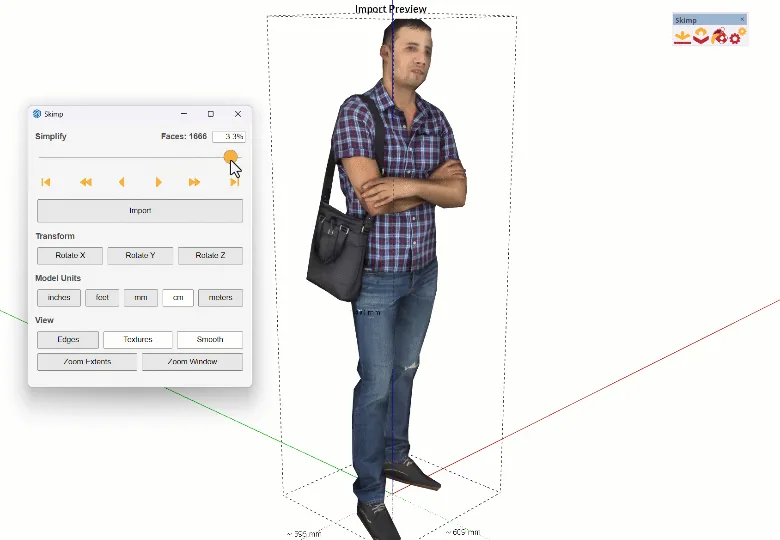
You open a file from another application or a 3D model site and see it first in a preview window. There you decide how many faces it should have before bringing it into the scene.
- Reads GLB, USD, FBX, OBJ, SKP, STL, DAE, 3DS, PLY and VRML
- Rotate about the axes and pick the units before importing
- The preview bounding box shows the dimensions, so wrong units are obvious straight away
- In a test by the developer, a 4.5 million polygon STL reached SketchUp in under half a minute, reduced to 2%
Works with: GLB USD FBX OBJ SKP STL DAE 3DS


Fewer faces in the groups and components you already have
You select one or more groups or components in the model and reduce their faces with a slider, seeing the result immediately.
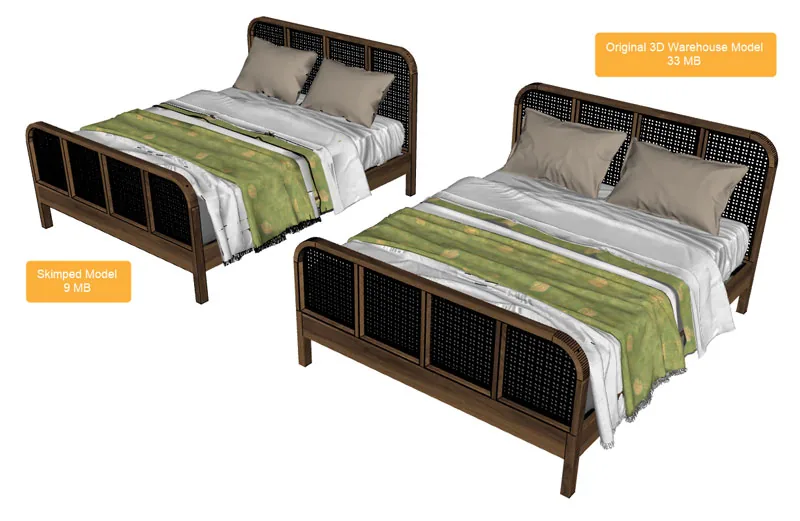
- Handy for detailed furniture and objects from 3D Warehouse
- Hierarchy, nested components and materials are kept
- The SKP file shrinks noticeably: in the developer’s example a bed went from 33 MB to 9 MB
- Runs inside SketchUp, with no external program
Works with: SketchUp 3D Warehouse


Distance-based error tolerance for engineered objects
When geometry matters, as with vehicles, appliances or models for 3D printing, you set a maximum deviation instead of a percentage of faces.
- Details larger than the tolerance are retained
- Normals, texture coordinates (UVs) and model boundaries are preserved
- Reduction is based on the Atangeo Balancer SDK, with a low memory footprint


Bring back textures lost during import
If an FBX or OBJ arrives without textures, the Replace Textures tool swaps them in without losing their placement on the faces.
- Ctrl + click a face and choose the new texture image
- UV coordinates stay as they were
- Optional temporary checkered texture on import, so placement survives even when files are missing
- Shift + click changes the material on all matching faces and cuts down duplicate materials


Skimp in action
Official video from the developer about Skimp.

See it in action
The video or demo loads only when you press play.
What it does, stage by stage
Skimp is a SketchUp extension that quickly imports high-polygon models and reduces their polygon count, so that the model stays light. Version 2.0 imports GLB, USD, SKP, FBX, OBJ, STL, DAE, 3DS, VRML and PLY.
Before importing, you see a preview of the model and set the orientation, units and number of faces. The preview also shows the model’s dimensions, so you can choose the right units without trial and error.
It also simplifies any group or component already in the model, with a slider. It keeps the hierarchy (components and nested objects), materials, texture coordinates (UV) and normals. For mechanical or industrial objects you set an error tolerance as a distance, so that details within it are kept.
The Replace Textures tool replaces textures that are missing after an import, keeping their placement. Simplification is based on the Atangeo Balancer SDK. In an example from the developer, a model from 3D Warehouse shrank from 33 MB to 9 MB with no significant change in appearance.
The developer offers an annual subscription and a perpetual (lifetime) licence, for one user, and a 5-day trial licence.


Features and files
Features
- Type
- SketchUp extension
- Import
- GLB, USD, SKP, FBX, OBJ, STL, DAE, 3DS, VRML, PLY
- Preview
- scale, orientation and number of faces before importing
- Simplification
- groups and components of the model, with error tolerance
- Preserves
- hierarchy, materials, UV, normals
- Textures
- Replace Textures tool
- SketchUp versions
- SketchUp Pro 2020 (desktop) or later
- Operating system
- Windows and macOS
- Licence
- Annual subscription or perpetual, one user
Opens and saves
- .skp
- .obj
System requirements
Operating system Windows, macOS
- SketchUp Pro 2020 (desktop) or later
- Windows or macOS
Works well with, and alternatives
Works well with


Skimp next to alternatives
Open the full comparisonQuestions, licence and delivery
Which SketchUp versions are supported?
SketchUp Pro 2020 (desktop) or later, on Windows and macOS.
Which files does it import?
GLB, USD, SKP, FBX, OBJ, STL, DAE, 3DS, VRML and PLY.
Which licences are available?
An annual subscription for one user, or a perpetual (lifetime) licence for one user that does not expire. Both include updates.
Is there a trial version?
Yes, a free 5-day trial licence.
Does it also simplify models already in SketchUp?
Yes, any group or component of the model, keeping the hierarchy and materials.
How do I receive the licence?
After payment we order the licence from the manufacturer and email you its details.
Do the prices include VAT?
Prices exclude VAT. With a valid VAT number from another EU country, VAT is not charged; in Belgium it is charged at 21%. For private customers, VAT is calculated at checkout.