
SketchPlus
by mind.sight.studios, SketchUp plug-ins
Over 40 tools for selection, moving, components, walls, roofs and camera in one SketchUp extension
Versions Annual subscription, Perpetual licence (Lifetime)
Price on request
Request a quoteOr call us: +30 210 440 0071 saleselitesoft.eu
More than 40 SketchUp tools in one extension
See what SketchPlus adds to selecting, moving, components, buildings and viewing, with tools that behave like SketchUp itself.
Select and move with fewer clicks
Tools familiar to anyone coming from other 3D software, plus moves you need in almost every model.
- Filter Selection keeps only the entity types or attributes you want in the selection
- Lasso and Polygon Lasso, drag-to-select with Selection Painter, and selection undo and redo
- Deep Select Face opens the group or component holding a face in one click (SketchUp 2020 or newer)
- Align to line objects up, Nudge with the arrow keys, Move to Z to a known height and Drop+ onto the surface below


Component library and editing made easy
Tools for finding, copying and arranging components across the whole model.
- Component Finder to search your component library
- Change Axes+ with 27 preset positions for a component's axes
- Path Array for copies along edges, and Smart Array to repeat the placement of two existing copies
- Sprinkle on Surface to scatter plants, plus random position, spin or scale for selected components

Walls, hip roofs, pipes and basic shapes
For buildings, SketchPlus draws walls, roofs and pipes as simply as drawing a line.
- Wall Tool: walls snap square and merge cleanly, with width and height typed into the measurements box
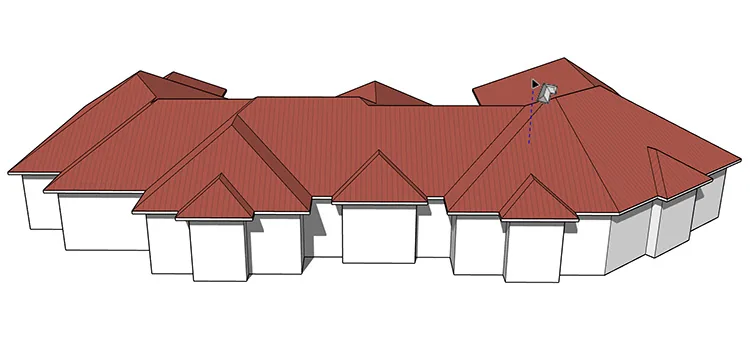
- Hip Roof: a hip roof in two clicks, with the pitch in degrees or as a ratio such as 7:12
- Pipe Tool for pipework, handrails, round columns and cables, with diameter and bend radius
- Sphere, cone and torus in a few clicks


Camera, materials and tags across the model
Small tools for jobs that take many steps in SketchUp, such as painting inside groups or clearing tags.
- Camera controls that SketchUp lacks, and view management across models and sessions
- Deep Paint Faces to paint faces across group and component boundaries
- Unpaint to strip materials throughout the depth of the model
- Untag to remove tags from groups, components, faces and edges, including nested ones


SketchPlus in practice
Official video from the developer, featured on the SketchPlus site.

See it in action
The video or demo loads only when you press play.

What it does, stage by stage
SketchPlus is a SketchUp extension with over 40 tools, many of which are usually found in other 3D programs: selection filtering and memory, copying along a path, scattering on a surface, random placement and alignment. It is one plugin instead of dozens of small ones, with a consistent way of working and a single developer for support.
For selection: undo and redo selection, Filter Selection, Lasso and Polygon Lasso, Deep Select Face (from SketchUp 2020), Selection Painter and Select All Instances. For moving: Align, Nudge, Move to Origin, Drop+ (drops onto the surface below), Move to Z, Flatten to Ground and Deep Stretch.
For components: Component Finder, Mirror+, Change Axes+ (27 preset axis positions), Replace Component+, Explode+ (recursive explode), Path Array, Smart Array, Sprinkle on Surface for scattering plants over surfaces, and random position, rotation and scale.
For buildings, the Wall Tool draws walls like lines, Hip Roof creates a hipped roof in two clicks with the pitch in degrees or as a ratio (e.g. 7:12), and the Pipe Tool creates pipes, handrails and round columns with a diameter and bend radius. There are also sphere, cone, torus, Make Faces+, camera tools (Walk+, Favorite Views, Spin View), Batch Save, Deep Paint Faces, Unpaint and Untag.
The developer offers an annual subscription and a perpetual (lifetime) licence, for one user, with a 15-day trial licence. Instructions for the tools are available in SketchUp's Instructor window.


Features and files
Features
- Type
- SketchUp extension
- Tools
- over 40 in one plugin
- Selection
- Filter Selection, Lasso, Deep Select Face, Select All Instances
- Components
- Path Array, Smart Array, Sprinkle on Surface, Replace Component+, Explode+
- Buildings
- walls, hipped roof, pipes
- Camera
- Walk+, Favorite Views, Spin View
- SketchUp versions
- SketchUp Pro 2017 (desktop) or later
- Operating system
- Windows and macOS
- Licence
- Annual subscription or perpetual, one user
Opens and saves
- .skp
System requirements
Operating system Windows, macOS
- SketchUp Pro 2017 (desktop) or later
- Deep Select Face requires SketchUp 2020 or later
- Windows or macOS
Works well with, and alternatives
Works well with



SketchPlus next to alternatives
Open the full comparisonQuestions, licence and delivery
Which SketchUp versions are supported?
SketchUp Pro 2017 (desktop) or later, on Windows and macOS. Deep Select Face requires SketchUp 2020 or later.
Which licences are available?
An annual single-user subscription, renewed every year, or a perpetual (lifetime) single-user licence, with updates that do not expire.
Is there a trial version?
Yes, a free 15-day trial licence with all features.
How many tools does it include?
Over 40, in groups for selection, moving, components, buildings, drawing, camera, materials and tags.
How do I receive the licence?
After payment we order the licence from the manufacturer and email you its details.
Do the prices include VAT?
Prices exclude VAT. With a valid VAT number from another EU country, VAT is not charged; in Belgium it is charged at 21%. For private customers, VAT is calculated at checkout.