

Click Kitchen for SketchUp (IKEA kitchen furniture from 2015)
by Click-Cuisine, SketchUp plug-ins
Kitchen design with IKEA cabinets inside SketchUp
Your kitchen with IKEA furniture, set up inside SketchUp
Click-Kitchen brings IKEA kitchen furniture into SketchUp and lets you change everything with a click on the model. Choose a topic.
IKEA cabinets ready to drop into your design
You draw the kitchen in SketchUp and place units from the IKEA kitchen ranges, without having to model them yourself.
- A large collection of IKEA kitchen unit references, in a form that opens directly in SketchUp
- One click swaps a unit, a fitting, a material or a dimension on the model itself
- Works in the free SketchUp Make as well as in SketchUp Pro
- The tools respond quickly, so the design keeps moving without waiting
Works with: SketchUp Make SketchUp Pro


Fronts, worktops and fittings change with a click
You try out colours and fittings on the same kitchen, so you can see many versions of it quickly.
- Replace the material on fronts, worktops and cover panels
- Change fittings such as handles, sinks and legs without rebuilding the unit
- Hide or show items such as handles or the splashback with a single button


From the drawing to realistic images of the kitchen
The model you built can be rendered photorealistically and serve as the basis for buying from IKEA or ordering from a joiner.
- Realistic images with whichever SketchUp rendering engine you prefer
- The companion extension Click-Change adds everyday objects such as jars and bottles for a livelier scene
- Clean up the SketchUp file automatically or manually, so it stays light
- The finished design helps you buy the units from IKEA or discuss a made-to-measure kitchen with a joiner


Click-Kitchen 2 overview
Official video from the developer showing the Click-Kitchen 2 tools inside SketchUp.

See it in action
The video or demo loads only when you press play.
What it does, stage by stage
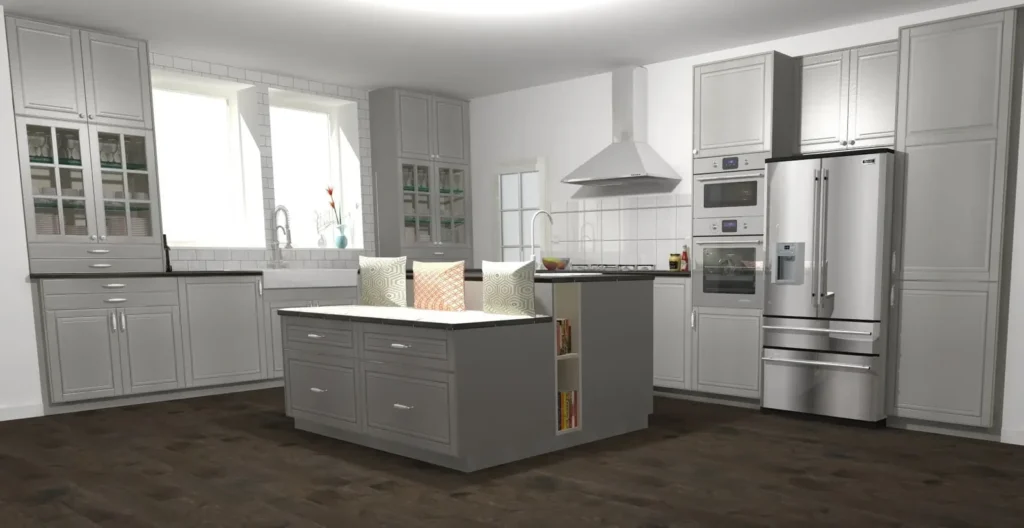
Click-Kitchen (Click-Cuisine in French) is a SketchUp extension by Dynamique Agencement of Paris for designing kitchens with units from the IKEA kitchen ranges. The units are dynamic components: you place them in the model and change the unit, material, fittings or dimensions with a click, without drawing them from scratch.
On the same model you try out fronts, worktops, handles, sinks and legs, and hide or show items such as handles with a single button. The companion extension Click-Change adds decorative objects, and the result can be rendered realistically with whichever SketchUp rendering engine you use. The finished design helps when buying the units from IKEA or discussing a made-to-measure kitchen with a joiner. The developer's current version is Click-Kitchen 2.


Features and files
Features
- Type
- SketchUp extension with dynamic components
- Use
- Kitchen design with IKEA furniture
- Dynamic components
- yes
- SketchUp versions
- Make and Pro, 2014 to 2026 (Click-Kitchen 2)
- Operating system
- Windows, macOS
- Developer
- Dynamique Agencement (Paris)
Opens and saves
- .skp
System requirements
- SketchUp Make or SketchUp Pro, versions 2014 to 2026 (according to the developer, for Click-Kitchen 2)
- Windows or macOS
Works well with, and alternatives
Works well with


Click Kitchen for SketchUp (IKEA kitchen furniture from 2015) next to alternatives
Open the full comparisonQuestions, licence and delivery
Do I need SketchUp Pro?
No. The developer states that it works in the free SketchUp Make as well as in SketchUp Pro.
Can I produce realistic images of the kitchen?
Yes, the model can be rendered with whichever SketchUp rendering engine you use.
How do I receive the licence?
After payment we order the licence from the manufacturer and email you its details.
Do the prices include VAT?
Prices exclude VAT. With a valid VAT number from another EU country, VAT is not charged; in Belgium it is charged at 21%. For private customers, VAT is calculated at checkout.